UI vs. UX Design: Understanding the Difference with Simple Examples
Understand UI vs. UX Design with simple examples, key differences, and how both work together to create user-friendly websites and apps.
Introduction
UI vs. UX Design becomes easier to understand when you picture two coffee shops on the same street. Both serve great coffee; however, their customer experiences differ significantly. One shop features wooden tables, soft lighting, and a beautiful menu board that immediately catches everyone's attention. Despite its attractive appearance, customers struggle to find the pickup counter, the queue moves slowly, and nobody knows where to find the napkins. In contrast, the second shop looks simpler, but everything works smoothly. Customers can walk in, place an order, pay, and collect their coffee in under three minutes. As a result, they enjoy a hassle-free experience without wasting time. This simple comparison explains the difference: UI design focuses on how a product looks, while UX design focuses on how easily people can use it.
Which coffee shop would you visit again?
This everyday example captures the heart of UI/UX design. The first shop gets the appearance right, whereas the second delivers a better customer experience. Ideally, the best coffee shops, websites, and mobile apps combine both to attract customers and keep them satisfied.
If you have ever felt confused about the difference between UI and UX, you are not alone. These terms often appear together; therefore, many people assume they mean the same thing. However, they represent two closely connected but different aspects of digital design. In this guide, we will explore what each term means, highlight their key differences, and explain how they work together through simple, practical examples. Whether you run a business website, manage a product team, or simply want to learn about design, this guide will help you understand UI vs. UX Design without complicated jargon.
What Is UI Design?
To understand UI vs. UX Design, let's first explore what UI design means. UI stands for User Interface, which includes everything a person sees and interacts with while using a website, mobile app, or digital product. For example, buttons, menus, icons, colors, fonts, images, spacing, and small animations all form part of the user interface. If a digital product were a house, UI would represent its paint, furniture, light switches, and door handles.
A UI designer's job is to make digital screens visually appealing, clear, and easy to use. They decide how large a button should be so users can tap it comfortably, which colors should indicate danger or success, and how text should appear to remain readable on smaller screens. Moreover, good UI design maintains consistency across every screen. Once users learn how one part of an app works, the remaining sections should feel familiar and easy to navigate.
In the discussion of UI vs. UX Design, UI focuses on the visual elements and interactive components that users experience directly. However, an attractive interface alone cannot guarantee a successful digital product. Designers must also consider how easily users can complete their tasks, which is where UX design comes into the picture.
Common User Interface Elements
Most digital products are built from a shared set of user interface elements. Here are the user interface elements you will spot everywhere:
Buttons to initiate actions like “Add to Cart,” “Submit,” “Send,” etc.
Input forms and boxes used to enter names, emails, keywords, and other information
Navigation bars allowing to switch between webpages
Icons – tiny pictograms sparing space and helping to identify an object faster
Selection elements including sliders, checkboxes, and toggles
Messages, notifications, informing a user about something happening or an error
None of the listed components is impressive separately. It is crucial to place them correctly to make the user interface look neat and not cluttered.
Responsive UI Design
People access websites using mobile phones, tablets, laptops, and even large screen displays in one day. The responsive UI design ensures that the layout works well for each screen size. While the three-column layout will work fine on the desktop screen, it will convert into a single-column layout when accessed from a mobile phone screen. The navigation bar will collapse into a simple menu icon. All the text and images will resize so that nothing is cropped or shrunk to such an extent that it cannot be read.
What Is UX Design?
Let's talk about the other half of the equation - UX design definition. What is UX? User Experience is concerned with functionality of the product and emotions users feel during its usage. UX designers ask such questions: Can users find what they need fast enough? Is the checkout process logical? Where are people getting lost or giving up?
Returning to our house analogy, UX is the floor plan that defines where the kitchen will be placed (next to the dining room or far away?), whether the bathroom will be easy to find or not and whether you'll have to go through the bedroom in order to get into your garage. Good UX remains unseen for you, and becomes visible only in case of its absence.
Most UX-related activities happen before any design takes place. This stage involves research, user interviews, user journey maps, sketches and prototype testing. Following a structured UI/UX design process helps teams create products that meet actual user needs. And the aim of all this is the product that solves actual problems in the most simple way possible.
The Role of User-Centered Design
Right at the heart of successful UX lies user-centered design. Under this methodology, the designers are constantly considering the needs of the eventual users of their product in all of their decisions. Rather than assuming what the needs and wants of the users are, they conduct research into the behaviors of the user, their pain points, their goals and what constraints they operate under such as poor Internet connection or even disability.
A clear example of this would be in a project to develop an application for the banking industry. The team designing it may initially think that the customers want many options on the main screen. But once they interview the actual users, they find out that what people really want to do with the app is simply check their account balance.
UI vs. UX Design: The Key Differences
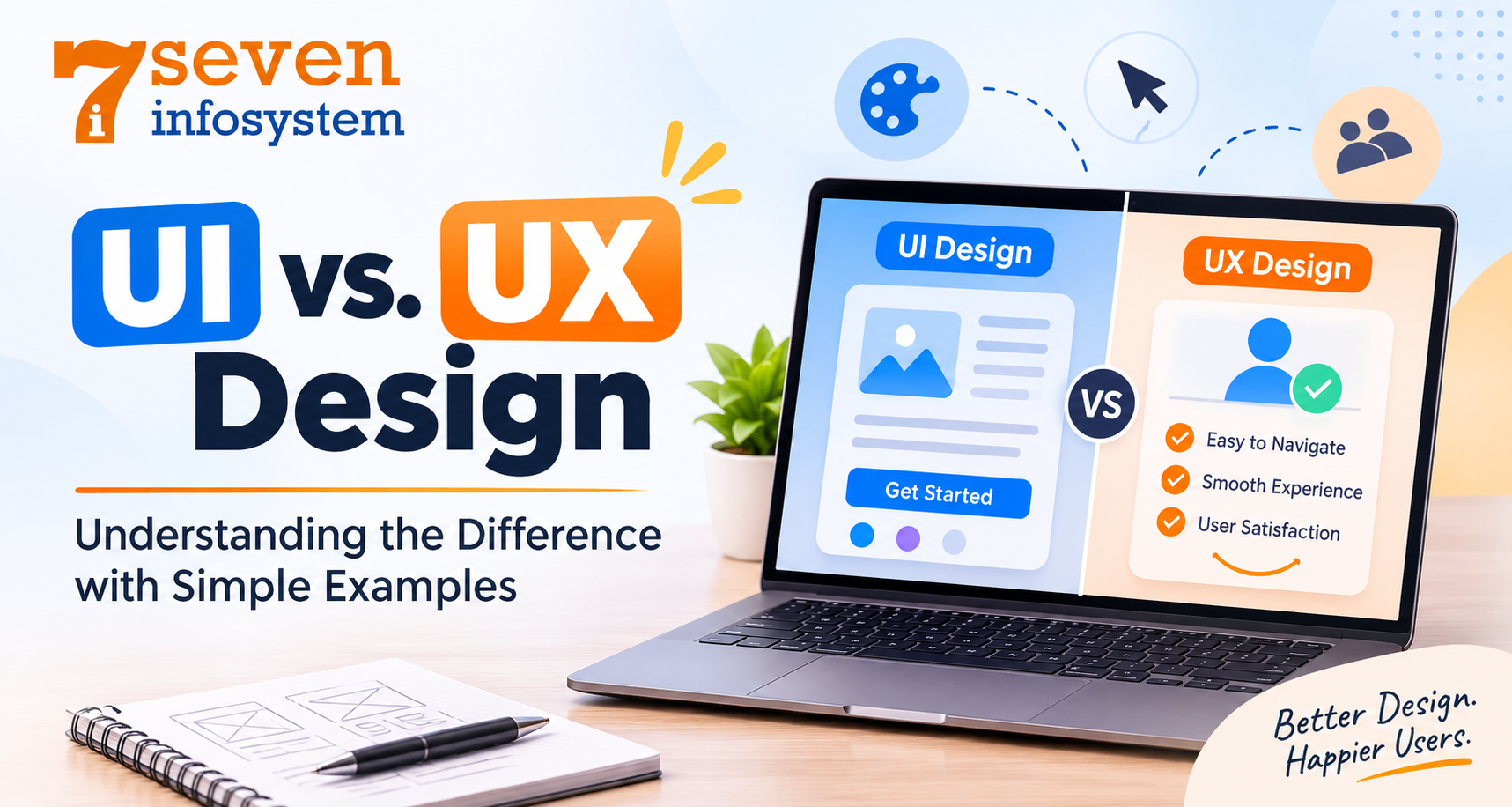
Well, what is the difference between UI and UX design in simple terms? UX design determines how things must function. UI design determines how things must appear and feel when using it. UX design focuses on process, while UI design focuses on the interfaces that you encounter during the process.
A useful analogy for distinguishing between user interface and user experience is taking a road trip. UX design includes finding the fastest roads, setting appropriate breaks and avoiding the most congested roads. The UI design includes the design of your car's dashboard that is easy to read, controls are easily accessible, and the car seats are comfortable. It is no fun to have a good route in a difficult car. It is not fun either to travel in an attractive car on a bad route and end up lost.
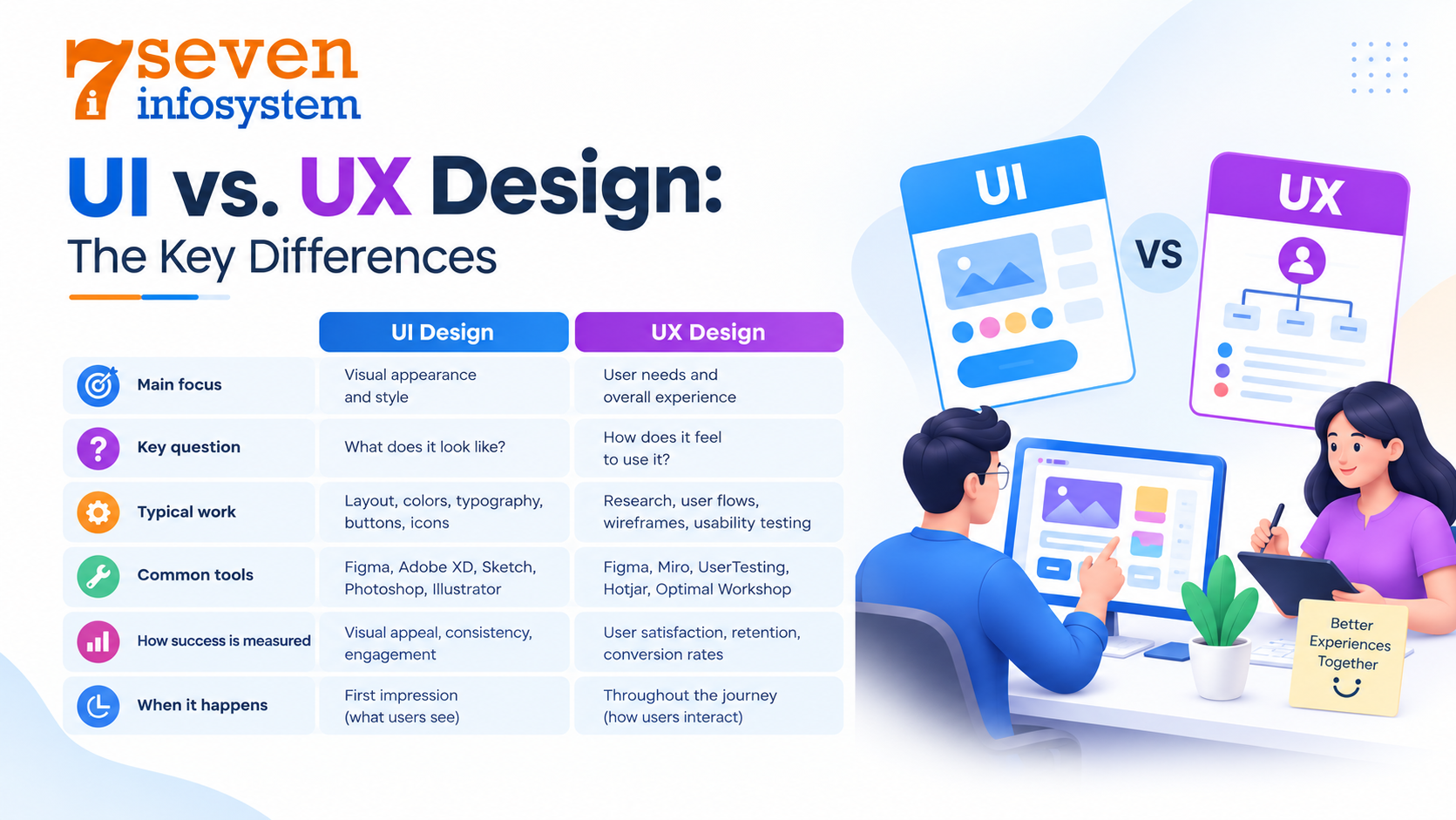
Now take a look at the differences between UI design and UX design:
Aspect | UI Design | UX Design |
Main focus | Look, layout, and interactive elements | The overall journey, ease of use, and satisfaction |
Key question | “Is this clear and appealing?” | “Does this solve the user’s problem easily?” |
Typical work | Color palettes, typography, buttons, icons, style guides | Research, user personas, journey maps, wireframes, testing |
Common tools | Figma, Sketch, Framer | Figma, Miro, analytics tools, usability testing platforms |
How success is measured | Visual consistency, clarity, brand fit | Task completion, time on task, drop-off rates, user feedback |
When it happens | Mostly after the structure is planned | From day one and throughout the project |
The line between these roles isn’t always sharp, though. In smaller teams, one person often handles both, which is why so many job listings simply ask for UI UX design skills. In larger companies, the roles split and the two specialists work side by side. Either way, each discipline depends on the other.
UI vs. UX Design in Action: Simple Examples
Definitions may help, but there is nothing better than simple examples for differentiating between the two concepts.
UI Design Examples
Below are UI design examples you have likely seen:
A weather application which combines the sun symbol with a high temperature number and a soft blue background to give you the forecast instantly.
An online store where the "Add to cart" button is highlighted in orange and the surrounding color scheme is toned down for instant visibility.
An audio player application with an easy-to-hit play button as well as a bar indicating the remaining time in the song.
The dark mode setting in order to change the color scheme.
It goes without saying that in all cases, the designer makes decisions regarding the visual interface.
UX Design Examples
Now compare those with these UX design examples:
Food delivery application which recalls your previous order, and therefore helps you to order the same dinner in just two clicks.
Online retail store which allows customers to checkout without making them create their account in the beginning.
Signup form which requires only email address and password from you, and gets the rest later on.
Travel booking portal which displays the total cost inclusive of tax and charges before the final checkout, to prevent any surprises for the user.
None of these have anything to do with color or font. These are examples of removing friction from the process.
A Website UI/UX Design Example
Take, for instance, the website of a local bakery. A good combination of these two approaches to design would mean appetizing pictures, warm colors, a readable menu and an obvious “Order for pickup” button in terms of UI design. In terms of UX design, opening hours and the address would be located on the front page; it would take just three clicks to order instead of eight, and it would be working fast even with poor mobile Internet connection. This way, there will be a user-friendly website design making random surfers become clients of the bakery.
A Mobile App UI/UX Design Example
Consider now a mobile application for fitness tracking. Effective mobile app interface design ensures that users can easily navigate screens, track their progress and access important features. The colorful progress ring and large enough buttons for using on smartphones (this is the UI design aspect) will be used. As for the UX design part, there will be a reminder at about the same time as usual, it will be possible to add a run with just one click, and all the weekly statistics will be visible at first sight without digging through three menus. Smartphone screens are tiny and applications can be opened on the go, so every additional click costs extra.
How the UX and UI Design Processes Work
UX and UI both involve some kind of process and these processes are much more alike than they are different. Here is an overview of the process for each.
The UX Design Process
The UX design process usually moves through these stages:
Research: Learn about users through interviews, surveys, analytics, and a look at competitors.
Define: Turn what is learned into problems to fix often shown as user personas and journey maps.
Ideate: Brainstorm possible solutions and sketch rough ideas.
Wireframe and prototype: Build simple, low-detail layouts and clickable mockups to test the flow.
Test: Watch real people try the prototype, note where they struggle, and make changes.
Iterate: Continue improving the product even after its release.
That last step matters most. UX changes over time so UX is never truly finished because people’s needs and habits keep shifting.
The UI Design Process
The UI design process picks up once the structure is in place:
First gather all the brand inputs. This includes logos, colors, tone of voice and any style rules that are already in place.
Next, set a direction. Use mood boards. Do early style experiments to find the right look and feel.
Then build a design system. This means defining typography, color palettes, spacing, buttons and icons. A solid design system keeps everything across the product.
After that design high-fidelity screens. Apply the style to each wireframe so the interface looks polished and complete.
Now add interactions. Think about hover states, transitions and small animations to make the experience feel smooth.
Finally hand off the work to developers. Share all the specs and assets so the final product matches the design exactly.
In real projects, both processes work together in cycles. Usability testing can reveal that users don’t notice some critical button, and it will be up to the UI designer to make this button more noticeable by adjusting color or size.
Why Is UX Design Important?
Why should you care about UX design? This is because people do not put up with confusing interfaces at all. Slow loading page or form will drive almost all users away in search of another similar product. Well-done website UX will keep users on the site until they find what they are looking for.
Here is how UX helps to achieve this goal:
Higher conversions: It will be easier to complete actions related to purchase or subscription when UX is good.
Fewer support requests: With clear UX, there will be fewer questions in form of "how do I..." e-mails and phone calls.
Stronger loyalty: People return to products that respect their time.
Better accessibility: Thoughtful design makes products usable for people with disabilities, older adults, and anyone on a slow connection.
Lower costs over time: Fixing a problem at the design stage is far cheaper than rebuilding a feature after launch.
User experience improvement doesn’t always call for a complete redesign. Small changes often make a big difference: shortening a form, rewording a confusing button label, adding a progress bar to a long checkout, or moving key details higher up the page. Many teams test tweaks like these and see real gains within a few weeks.
Bringing UI and UX Together for the Best Results
UI and UX work best when planned together from the beginning of a project. Following modern website design trends can also help businesses create visually appealing, responsive and user-friendly websites. Perfect UI and UX designs seem very easy and obvious to those who use them, which is the reason why they require such great effort during the process.
There are several approaches that will help to achieve this:
Always think of people first, not of pixels. First do the research and then style it.
Ensure that the look of the website is consistent everywhere.
Perform tests as early as possible, even on prototypes.
Focus first on creating something suitable for a mobile device and scale it up.
Create understandable labels for your buttons and messages.
Consider the day of the launch as a beginning and collect as much feedback as possible.
Think of the applications that you use every single day. It is highly unlikely that you will remember the precise color of their buttons but you will surely know how to interact with them.
Conclusion
However, the question of UI vs. UX is not so much about choosing either of them, but rather combining both approaches into one single experience. UI is something visible and tangible for the user; UX is about all processes and its emotions. An aesthetically pleasing product with an inconvenient path will disappoint the users, while a smartly designed process within a messy interface will fail to gain the users' trust.
In order to create a perfect product, one has to combine both concepts in such a way that will result in something pleasant to use. To develop a new product or renew an existing one, start by understanding user needs and creating the most effective user journey. This is an important part of software product development, where design and prototyping help transform ideas into practical digital solutions.
FAQs
1. Can one designer handle both UI and UX?
Yes. Many designers, especially at startups and small agencies, cover both roles, while larger teams usually split them for deeper focus.
2. Which comes first, UI or UX?
UX usually comes first, since the structure and flow need planning before the visual layer is added. After that, the two overlap through testing and revisions.
3. Do I need coding skills to become a UI/UX designer?
Not necessarily. Basic HTML and CSS help you work smoothly with developers, but most design work happens in tools like Figma.
4. How can I tell if my website has poor UX?
Watch for high bounce rates, abandoned carts, and repeated support questions. A quick usability test with five real people often reveals the biggest problems.
5. Is responsive design part of UI or UX?
It’s part of both. Adjusting the layout is UI work, while keeping tasks easy on every device is a UX concern.