HR Management Software: The Complete Guide for Modern Businesses
Learn how HR management software simplifies employee management, attendance, payroll, leave, and HR operations for modern businesses.
Introduction
Managing employees efficiently is a part of running a successful business. As companies grow, handling employee records, attendance, leave, payroll, compliance and other HR activities by hand can become very time-consuming and hard to manage.
This is where HRMS management software can make a difference. By keeping employee information in many spreadsheets, documents, emails and separate systems businesses can use one central platform to organize and automate essential HR processes.
Modern HR solutions are made to help HR teams cut work, boost data accuracy, simplify employee management and make important information easier to reach.
For businesses in India picking the system is especially important because HR and payroll processes may need compliance with PF, ESI and TDS. A suitable human resource management system can combine these activities. Give businesses clearer visibility into their workforce.
What Is HR Management Software?
HR management software is a tool that helps companies handle all the things related to their employees. It acts as a place where all employee details are kept. This kind of software can make it easier for HR people to deal with things, like when employees come to work, when they take time off, how much they get paid, their records and making reports.
A modern HR management system replaces many manual processes with digital workflows. Instead of maintaining separate spreadsheets for employee information and attendance, businesses can bring relevant information into one system.
The exact capabilities vary between platforms. Some solutions focus mainly on employee records. Others offer a complete setup by bringing together HR, attendance leave, payroll and compliance features in one place.
For organizations that are growing, having all these functions in one system helps make HR work more organized and simpler to handle.
What Is HRMS?
HRMS stands for Human Resource Management System. It is a type of software that helps with HR tasks in a company.
When people search for “What is HRMS”, they are generally looking for a system that can help manage employees and HR processes from a centralized platform.
An HRMS can include capabilities such as:
- Employee information management
- Attendance tracking
- Leave management
- Payroll processing
- Employee records
- HR reporting
- Compliance-related information
- Employee self-service features
An HRMS does not have to include all HR tasks. Companies should look at the features they really need and choose a system that fits their size, their way of working, their employees and their business needs.
Why Do Businesses Need HR Management Software?
Traditional HRM may suit a very small workforce but generally becomes complicated as organizations grow.
HR departments may have to keep track of employee data, track attendance, process leaves, make payroll calculations, generate reports, and keep track of compliance-related data. Doing this manually is likely to lead to duplication of data, delays, and errors.
An HRM system can provide assistance in this regard.
- Reduce work: Automating tasks that happen over and over again helps HR people spend less time changing numbers in spreadsheets and more time working with employees and dealing with company issues.
- Keep employee information organized: Rather than keeping details in different files companies can store all the information about employees in one place.
- Improve data accuracy: Having all the data in one spot and using automation can stop people from entering the information again and again. This helps make sure the numbers are right and reduces mistakes that happen when people do the job over and over.
- Make HR information easier to access: People who are allowed to see the information can get what they need from the system of looking through many papers or spreadsheets.
- Support Business Growth: As employee numbers increase, a structured HR system can provide a more scalable way to manage HR operations.
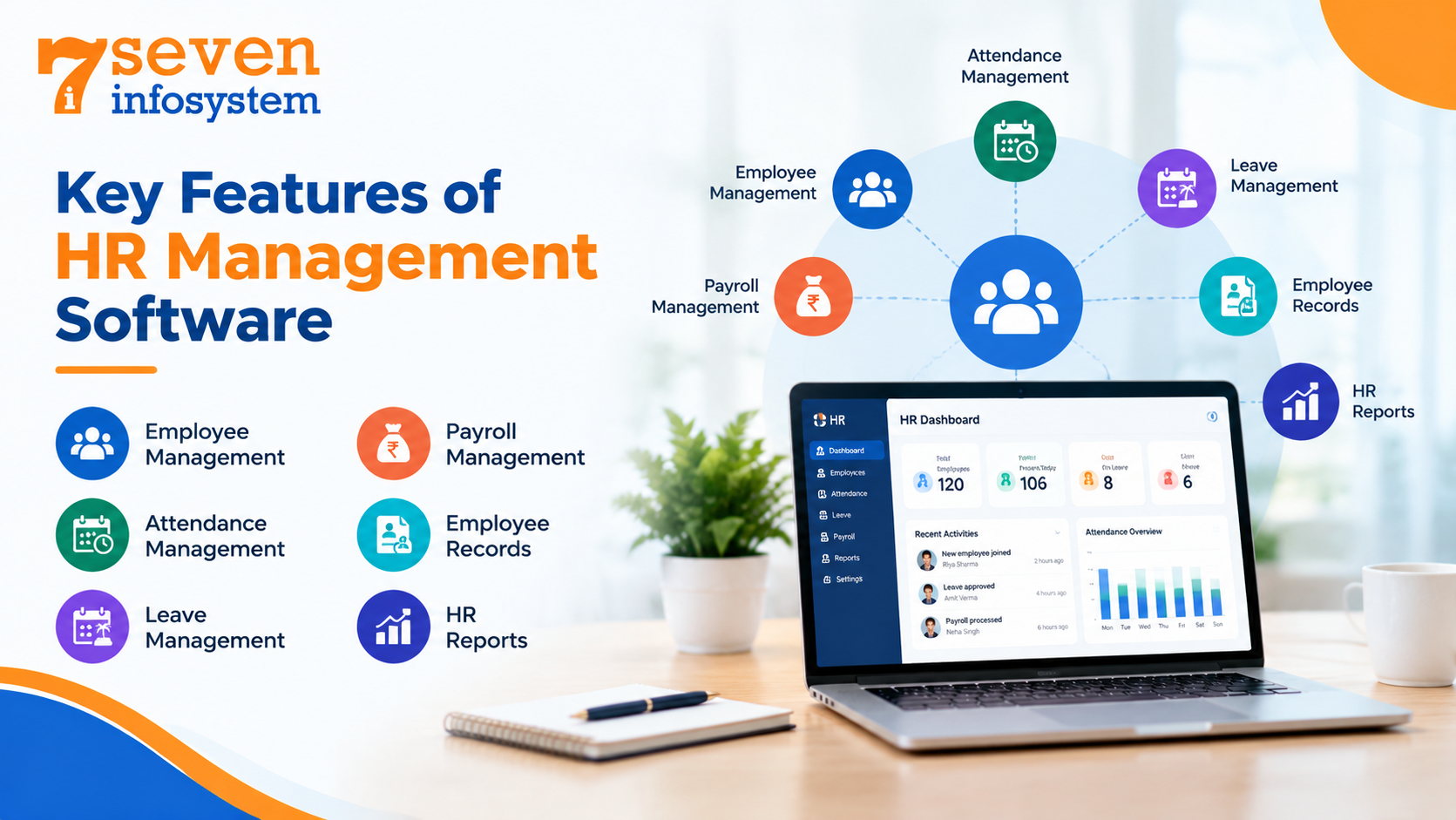
Key Features of HR Management Software
The features available depend on the platform and plan, but businesses should generally evaluate the following capabilities when comparing HR solutions.
1. Employee Management
Employee management software helps organizations keep employee information in an organized way.
Depending on the system, employee management software may hold employee profiles, contact details, job information, hiring dates, documents and other important records.
A centralized employee database makes it simpler for authorized HR staff to locate and refresh employee data whenever needed.
2. Attendance Management
Tracking attendance is one of the most common HR requirements.
An HRMS can help businesses record and monitor employee attendance digitally. Depending on the implementation, attendance information can be used alongside leave and payroll processes.
This can reduce the need for manually maintaining attendance spreadsheets and help HR teams maintain more consistent records.
3. Leave Management
It becomes hard to manage leaves using emails, messages, or even spreadsheets as the number of employees increases.
The use of digital leave management would ensure that employees apply for their leaves, which are then approved by the relevant managers or HR.
It also makes record keeping easier.
4. Payroll Management
Payroll is another important part of HR operations.
HR and payroll software can connect employee information with payroll-related processes, helping organizations reduce repetitive data entry and maintain more consistent payroll records.
For Indian businesses, payroll management may also involve statutory requirements such as PF, ESI, and TDS. The exact compliance capabilities should always be checked with the software provider and against the organization's current requirements.
5. Employee Records
The data within such records can help the HR team in carrying out their duties on a continuous basis during the life cycle of the employee.
When I use a HR system I find that Employee records stay neat, easy to update and quick to find while giving Employee records proper access control.
6. HR Reports
HR reporting can help management understand workforce information clearly.
Depending on the platform, reports may cover areas such as attendance leave, employee information or payroll.
These reports can support planning and help HR teams identify trends or administrative issues.
Benefits of Using HRMS Software
The value of an HRMS goes beyond replacing paper or spreadsheets. The real benefit comes from building an organized and structured HR process.
- Better HR Efficiency: Streamlining of repetitive processes allows lowering the burden on administration and leaves more time for HR to handle important tasks.
- Centralized Information: Keeping employee and HR information in one platform can make everyday administration more organized.
- Improved Employee Experience: Digital processes can make activities such as leave requests and access to employee information more convenient, depending on the system's features.
- Easier Monitoring: Centralized attendance, leave, and employee information can give HR teams better visibility into workforce operations.
- Scalable HR Operations: A system that can accommodate additional employees and processes can be useful as an organization grows.
HRMS Software for Small Business: Is It Worth It?
Small businesses sometimes assume that an HRMS is only useful for large organizations. However, smaller companies can also benefit when HR administration starts taking significant time.
HRMS software for small business can help organizations create consistent processes from an early stage.
For a small company, useful features may include:
- Employee records
- Attendance
- Leave management
- Payroll
- Basic reporting
- Employee information management
- Compliance-related payroll support
The main thing is to not pay for things you don't need. A small company should find a solution that has the features it needs without making HR work too hard.
For companies thinking about HRMS for small business ease of use, ability to grow help during setup and overall cost should be checked together with the list of features.
Cloud-Based HRMS: What Does It Mean?
A cloud-based HRMS stores and operates HR software through cloud infrastructure depending only on software that is installed on a local computer or server.
Cloud solutions can offer access to business applications depending on how the provider designs their architecture and handles security.
HRMS cloud solution can be especially helpful for companies that have teams spread across locations or, for managers who need to reach HR data from various places.
However companies should not pick software just because it is cloud-based. They must also check security, user permissions, data backups, system availability, how data is managed, support services, integration options and how reliable the provider is.
HRMS Software in India: What Should Businesses Consider?
Businesses evaluating HRMS software in India should consider both general HR functionality and requirements relevant to their workforce and payroll processes.
For example, organizations may need to manage attendance, leave, payroll, PF, ESI, and TDS-related processes.
Seven Infosystem's Seven HRMS Cloud is positioned specifically as an HR and payroll platform for Indian compliance, with attendance, leave, PF, ESI, and TDS included among its stated capabilities.
Nevertheless, businesses should verify the precise statutory rules, calculations, configurations, and compliance requirements applicable to their organization before relying on any payroll system.
Choosing HR Software for Indian Businesses
When evaluating human resource management system software in India, consider:
- Employee count and expected growth
- Attendance requirements
- Leave policies
- Integration requirements
- Customer support
- Implementation process
- Overall cost
This approach enables firms to make their selections depending on the practical needs of the organization as opposed to picking an application that offers a wide range of functions.
How to Choose the Best HRMS Software
There is no one solution that can be called the best HRMS software for any business.
It all depends on a number of factors such as size of the firm, employees, HR functions, budgets, compliance requirements, among others.
The following should be considered before making the selection.
Understand Your HR Requirements
Start by documenting your current HR processes.
Identify which activities are still handled manually and which areas create the most administrative work.
Check Core Features
Make sure the platform supports the HR functions your organization actually needs.
For many businesses, these may include employee management, attendance, leave, payroll, and reporting.
Evaluate Ease of Use
Software should make HR administration easier, not introduce unnecessary complexity.
Ask HR employees and potential users to test the system before making a decision.
Consider Scalability
The system should be capable of supporting your organization as employee numbers and operational requirements increase.
Review Security
Employee and payroll information can be sensitive. Evaluate user permissions, authentication, data protection, backups, and the provider's security practices.
Check Support and Implementation
Software implementation is not only about acquiring the licensing rights.
Companies need to know how the onboarding process, configuration, training, troubleshooting, and support will be handled.
Affordable HRMS Software: What Should You Look For?
The term affordable HRMS software should not just mean the subscription price.
A cheaper option might turn into a choice if it is missing key features or needs a lot of manual work.
When looking at costs think about the value of the platform including:
- Subscription or license fees
- Implementation costs
- Employee limits
- Additional modules
- Data migration
- Future upgrades
Businesses should also compare pricing based on their actual employee count and required features.
If you are researching HR software price in India, remember that pricing structures vary significantly between providers. Some charge per employee, while others use fixed plans or modular pricing.
Requesting a detailed quotation based on your requirements is generally more useful than comparing headline prices alone.
HRMS Software Providers: How to Compare Them
There are many HRMS software providers serving businesses with different needs.
Instead of selecting a provider based only on popularity or the number of features advertised, evaluate the complete offering.
Look at:
- Product capabilities
- Industry and business-size suitability
- Security practices
- Compliance support
- Ease of implementation
- Integration options
- Customer support
- Pricing transparency
- Scalability
- Product roadmap and ongoing development
A good provider should be able to explain how the software fits your current workflow and how it can support future requirements.
HR Management Software vs Manual HR Processes
The difference between automated HR management systems and manual ones is more evident in the case of growing businesses.
If businesses use manual processes, then the information about employees could be scattered throughout all kinds of spreadsheets, papers, e-mails, etc., and there will always be a need to enter or confirm the same information again and again.
All this data can be arranged in a certain system in the case of automated HR management.
It doesn’t imply that all the manual processes have to go away completely, but only those which can be automated without losing anything important.
HRMS vs Spreadsheets
Spreadsheets stay useful for business activities especially when teams are small.
However spreadsheets can become hard to manage when employee numbers grow or many people need to update information.
An HRMS can give workflows central employee records, access controls and special HR functions that spreadsheets do not naturally give.
From my view the decision should depend on business needs. A small organization with needs can manage some activities well with spreadsheets while a growing organization may gain from a dedicated HR platform.
Common Mistakes When Selecting HR Software
Businesses can make the selection process more difficult by focusing only on features.
- Choosing Based Only on Price: The cheapest option may not provide the required functionality or support.
- Ignoring User Experience: If HR employees find the system difficult to use, adoption can suffer.
- Buying Unnecessary Features: More features do not automatically mean a better solution. Choose functionality that addresses genuine business requirements.
- Not Planning Implementation: Data migration, configuration, employee onboarding, and training should be considered before deployment.
- Ignoring Security: Employee and payroll information requires appropriate protection and access controls.
Why Seven HRMS Cloud Can Be Considered for Indian Businesses
Seven Infosystem develops its own software products, including Seven HRMS Cloud, alongside ERP and CRM platforms. The company's HRMS offering is positioned around HR and payroll for Indian compliance, with attendance, leave, PF, ESI, and TDS capabilities.
Seven Infosystem also emphasizes scalable architecture, custom solutions, and long-term support across its broader software offering.
For a business evaluating an HRMS, the important step is to compare the platform's capabilities with its own HR workflows and requirements.
Conclusion
The right HR management software can help businesses move from fragmented and manual HR administration toward a more structured digital process.
A modern human resource management system can bring employee information, attendance, leave, payroll, and other HR activities into a centralized platform. ERP for small growing businesses, this can reduce repetitive administrative work while creating processes that can scale with the organization.
Businesses in India should pay particular attention to payroll and compliance-related requirements, including PF, ESI, and TDS, while also evaluating security, usability, scalability, implementation, and support.
Whether you are comparing HRMS software for small business, researching cloud solutions, or looking for an HR and payroll platform for a larger organization, the best approach is to start with your actual business requirements.
Seven Infosystem's Seven HRMS Cloud is one option businesses can evaluate for managing HR and payroll processes in an Indian business environment. Its stated capabilities include attendance, leave, PF, ESI, and TDS management.
The goal should not simply be to find software with the most features. It should be to choose an HR system that makes everyday HR operations more organized, efficient, secure, and manageable as your business grows.
FAQs
1. What is HR management software?
HR management software is a digital platform that helps businesses manage employee information and HR processes such as attendance, leave, payroll, and reporting.
2. What is HRMS?
HRMS means Human Resource Management System. It is software used to organize and manage different HR activities through a centralized system.
3. Is HRMS software suitable for small businesses?
Yes. Small businesses can use HRMS software to organize employee information and automate processes such as attendance, leave, and payroll. The ideal solution depends on the company's size and requirements.
4. What is cloud-based HRMS?
Cloud-based HRMS is an HR software solution delivered through cloud infrastructure. It can provide convenient access to HR functions without requiring businesses to maintain the entire application infrastructure locally.
5. How much does HR software cost in India?
There is no universal price. HR software price in India depends on factors such as employee count, features, modules, implementation, integrations, and the provider's pricing model.
6. What should I look for in HRMS software?
Businesses should consider employee management, attendance, leave, payroll, reporting, security, scalability, usability, compliance requirements, support, and total cost.