Data Security & Privacy in 2026: A Complete Guide for Businesses
Discover data security and privacy best practices for 2026. Learn how businesses can protect sensitive information, prevent data breaches, and build trust.
Introduction
Data Security & Privacy are essential in today’s world because businesses rely on technology to manage customer information, process payments, communicate with employees, and deliver online services. As companies adopt more digital tools, protecting sensitive information becomes increasingly important. For example, a single security issue can expose confidential records, interrupt business operations, and damage customer trust.
However, data security and privacy are not concerns limited to large corporations. Small businesses, startups, software companies, e-commerce stores, and service providers also collect and use personal information. Therefore, every organization needs effective measures to protect that data. In addition, customers increasingly expect businesses to handle their personal information responsibly, transparently, and securely.
By 2026 businesses can’t depend on passwords and antivirus software. Cloud platforms, mobile apps, web systems, artificial intelligence and third-party tools all add risks. These technologies open doors for data exposure. So companies must take an organized approach. They need systems, trained employees, clear rules and continuous monitoring to stay safe.
What Is Data Security & Privacy?
People often talk about data security and data privacy together. They are not the same thing. They both deal with protecting information. In different ways.
Data privacy concerns how personal information is collected used stored shared and deleted It involves respecting individuals rights communicating data practices clearly and following applicable legal requirements
For example an online shopping company might use encryption to protect a customer’s address and credit card details. This is a data security step. The company also has to explain why it collects the address and how it will use that information. That is a data privacy step.
Thus, for instance, if an online shopping website uses encryption to secure customer addresses and any other payment-related information, it is data security. If, however, the company informs the customer why it needs the customer’s address and what it is going to do with this information, it is data privacy.
Why Data Security Matters for Businesses in 2026
Businesses store valuable information, including customer contact details, employee records, financial documents, source code, business plans, and login credentials. If this information becomes accessible to the wrong people, the consequences can extend far beyond a technical problem.
1. Keep customer trust
Customers give information because they believe businesses will take care of it properly. A data breach can destroy that belief. Make people not want to use a company's services again. On the other hand clear rules and strong protections show that the company cares about its duties.
2. Reducing financial and operational risks
I see that when a security incident happens it can bring investigation costs, recovery expenses, service interruptions and possible legal duties. For this reason it is usually better to take steps than to react after a big incident.
3. Supporting legal and regulatory responsibilities
Businesses may need to comply with privacy and security requirements depending on their location, industry, and the types of information they process. Understanding relevant data privacy regulations helps organizations establish suitable processes and avoid treating compliance as an afterthought.
4. Protecting digital products
I notice that businesses that build websites, software and mobile apps need to think about security from the start to the end of the product life. A flaw in a login page database or API can reveal user data to people.
Consequently putting security into day‑to‑day business growth activities is a move toward lasting digital growth.
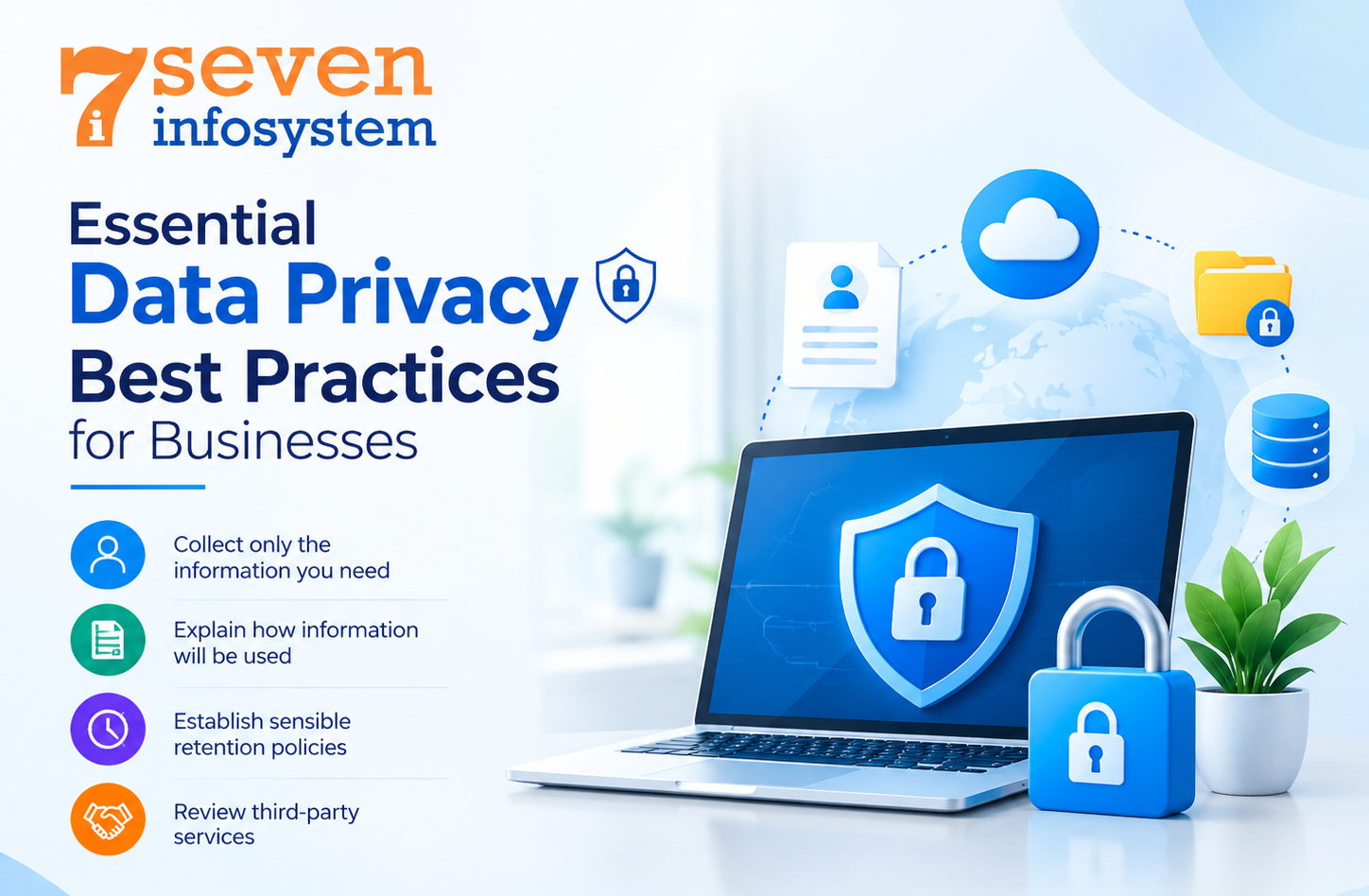
Essential Data Privacy Best Practices for Businesses
protection does not always need a costly security platform. Businesses can start with steps and then improve them as their systems grow and their responsibilities increase.
1. Collect only the information you need
Every extra piece of personal data brings another duty. Before gathering data identify the business purpose. Decide whether the data is truly required.
For example a newsletter sign‑up normally needs an email address and not the customer’s full home address. Limiting the data that is collected cuts the amount of information that must be kept safe and makes later management easier.
2. Explain how information will be used
Provide clear privacy notices that explain what information you collect, why you collect it, how long you retain it, and whether you share it with other organizations. Avoid confusing language or statements that make promises your business cannot maintain.
Also review forms, cookie settings and marketing preferences to make sure users get the information and have proper choices.
3. Establish sensible retention policies
Keeping information forever can create more risk without any real business help. Set time limits for keeping information based on what you need for your business, what you're required to do by contracts and what the law says.
When information is no longer needed, get rid of it in a way or make it anonymous if that works. Make sure the policy includes copies that're, in old files, backups and services that you use with other people.
4. Review third-party services
Payment providers, cloud platforms, analytics tools, customer relationship management systems and marketing services may handle information for you. Before using a service I recommend looking at its security features, privacy policies, access rules and what it is responsible for. Checking these things regularly is very important when a business uses platforms.
Practical Data Protection Strategies to Reduce Risk
A written policy is helpful. It only works when supported by real practical steps. A layered strategy helps businesses stop issues and limit damage when problems do happen.
Use strong passwords and multi-factor authentication
Start with passwords. Each password should be different and hard to guess. Use a trusted password manager to keep them safe. Avoid shared accounts because they make it hard to know who accessed what.
Add multi-factor authentication wherever possible. This means a step like using an authenticator app or a security key. Turn it on for email, admin dashboards, cloud accounts, developer tools and any system that holds information. This extra step makes a difference.
Apply data access control
Not every employee needs access to every file or system. Data access control allows organizations to grant permissions according to job responsibilities and business requirements.
For instance, an employee in marketing would require access to campaign statistics but not payroll information. Programmers might require data from the production system which holds customers' data.
Check permissions often take away access when employees move to roles and turn off accounts quickly when someone leaves the company. These actions follow the principle of privilege, which ensures people only have access to what they really need.
Encrypt sensitive information
Encryption makes information hard to read for people who don’t have the key. Companies should use connections when sending data and use proper encryption for sensitive data stored on devices, servers and cloud services.
Encryption alone isn’t enough. Organizations need to keep encryption keys, manage access, update systems and watch for strange activity.
Common Cybersecurity Risks for Businesses
By identifying possible cybersecurity threats, businesses will be able to choose which measures to take. In the process of cybersecurity for businesses, not only attacks but also operational errors should be considered.
Malware and ransomware
Malicious software can steal information, disrupt operations, or prevent access to important files. Ransomware may also involve threats to publish stolen information.
Keep all operating systems and apps up to date. Limit which software employees can install. Use endpoint protection tools on every device. Always keep backups. Make sure they work when needed. Most importantly, have an incident response plan ready before anything goes wrong.
Weak applications and exposed databases
Websites and software that are not properly secured can let out records because of login systems, too much access rights, wrong server setups or dangerous database searches.
Checking security often helps find problems before bad people use them. Teams that build software should also keep control areas safe, get rid of services and not put secret information directly in the code they write.
Third-party and supply-chain risks
A company can be harmed by problems, in software libraries, plugins, contractors or outside service companies. It is important to keep a list of dependencies, update parts that are still supported and look into security warnings that are connected to the technology being used.
Human errors and excessive privileges
Sometimes an attack does not have anything to do with hacking and may be caused by an employee mistake.
Proper procedures and permissions will minimize this threat without hindering employees' work.
Cloud Data Security: Protecting Information Online
Cloud services help businesses grow their operations, work together from locations and avoid the burden of managing their own infrastructure. Putting data in the cloud does not mean it is safe by default.
Security in the cloud depends on knowing who is responsible for what—whether it’s the cloud provider or the business using the service. These roles change depending on the type of cloud service and the agreement signed.
Begin with permission settings. Do not allow access to private storage unless it is absolutely necessary and has been approved. Use authentication methods. Check activity logs regularly. Encrypt data. Keep an eye on any changes to configurations.
Businesses should also know where their data is stored, how it is backed up and how they can get it back if the service stops or the contract ends. Having a clear exit plan can help avoid being stuck with one provider.
Lastly, test how recovery works. Check cloud accounts often, for users old access keys and permissions that are no longer needed. These small steps can stop data from being exposed by accident.
Secure Software Development and Web Application Security
Organizations developing digital products should look at security as part of their development process and not as a testing process at the end.
Build security into the development lifecycle
There is no such thing as safe software development without knowing the information the software will work with and the risks that could happen if unauthorized people get hold of it. Groups need to set security rules before starting to build and make sure those rules are part of design meetings, coding rules, testing and getting approval to release the software.
Programmers should check inputs, manage errors in a way, keep authentication processes protected and make sure private details are not shown in logs or error messages. Looking at code together and using checks can find usual problems before the software goes live.
Protect web applications and APIs
Web application security is about protecting web applications from access, data leaks and data being changed in an incorrect way. Some steps that should be taken are making sure session management is secure, making sure server-side authorization is in place, checking input carefully and keeping frameworks up to date.
APIs also need protection because they link apps, websites, databases and other services together. Best ways to keep APIs safe are: check user permissions whenever a request is made to prevent too many requests from coming in, look at the data that is being sent, keep passwords and keys safe and watch out for anything that seems strange.
An API key is not the same as authentication or authorization. Also just making a button invisible, on the user interface does not stop a user from sending a request.
Test applications before and after release
Software security testing can involve scanning for weaknesses, checking for outdated libraries, analyzing code, reviewing settings and running approved security tests. Software security testing helps keep the application safe.
It all depends on the complexity of the applications being used and the sensitivity of the data involved.
Test procedures should be continued even after an application is live since applications evolve with time. Issues such as additional features and software upgrades can cause problems. Software company that explain these safety measures to their clients demonstrate the importance of quality beyond looks and functionality.
Information Security Management: Creating a Security-First Culture
Just technology will not safeguard your company’s business. Information security management unifies all policies, people, duties, and controls into one thing called security.
Create clear security policies
A useful security policy explains how employees should handle confidential information, use company devices, share files, manage passwords, and report suspicious activity. Policies should be practical enough for employees to follow and specific enough to establish clear expectations.
For instance, an enterprise may implement a rule where staff needs approval to upload customers’ data to any outside application. It is vital in case when your employees use AI assistants or some online services to do their regular job.
Train employees regularly
Employees should understand how to recognize phishing attempts, protect their devices, handle customer records, and report possible incidents. Short, regular training sessions often make these responsibilities easier to remember than a policy document that nobody revisits.
Consider using realistic examples relevant to your business, such as a fraudulent invoice or an unexpected request for customer information.
Monitor systems and prepare for incidents
Keep an eye on your systems to catch unusual logins, unexpected file downloads, suspicious changes to settings and repeated failed login attempts. Monitoring should be fair, well managed and follow privacy rules.
Prepare an incident response plan that identifies who investigates an incident, who makes decisions, how affected systems are isolated, and when customers, partners, regulators, or authorities must be notified. The exact notification obligations depend on the circumstances and applicable law.
Data Privacy Regulations and Compliance in 2026
Data privacy compliance involves understanding the legal requirements that apply to your business and translating them into daily processes. Obligations can vary according to the country, industry, type of personal information, and role an organization plays in processing that information.
For example, the European Union's General Data Protection Regulation (GDPR) may apply to organizations that process personal data within its scope. In India, businesses should assess their obligations under the Digital Personal Data Protection Act, 2023, and the applicable rules, commencement notifications, and other relevant laws in force at the time.
Steps businesses can take
Identify the data you handle: Document what personal information you collect, where it is stored, and which systems or providers can access it.
Review your privacy notices: Make sure explanations of data collection and use accurately reflect your actual practices.
Set up appropriate processes: Establish procedures for handling relevant requests, correcting information, managing retention, and responding to incidents.
Review suppliers and contracts: Understand which parties process information and what safeguards or contractual responsibilities apply.
Keep records and review changes: Document important decisions, review controls periodically, and update processes when business operations or legal requirements change.
Compliance is not simply a document or certification. It requires ongoing attention to how information is actually handled. For complex situations, seek advice from a qualified legal or privacy professional.
Choosing Data Security Solutions for Your Business
The right Data Security & Privacy solutions depend on your organization's size, technology, budget, and risk level. A small business may begin with managed software updates, strong authentication, endpoint protection, secure backups, and carefully configured cloud services. Meanwhile, a larger organization may also need centralized monitoring, data loss prevention, identity management, and dedicated security operations.
Before purchasing a tool, identify the specific problem it should solve. Effective Data Security & Privacy practices require more than advanced software because even the best tools may fail to protect information if basic permissions are misconfigured or employees lack proper training.
When comparing solutions, consider ease of management, compatibility with existing systems, reporting capabilities, technical support, and total cost. Additionally, establish who will maintain the solution after deployment to ensure your security measures remain effective over time.
Businesses developing custom websites or applications should prioritize Data Security & Privacy during the project planning stage. Discuss how customer information will be stored, who can access it, how vulnerabilities will be fixed, and what happens when the application reaches the end of its useful life.
Ultimately, the best Data Security & Privacy solution is one that addresses real business risks, protects sensitive information, and can be maintained consistently as your organization grows.
Conclusion
Data security & privacy are essential parts of running a reliable, trustworthy business in 2026. As organizations depend more heavily on cloud platforms, websites, mobile applications, and connected software, protecting sensitive information requires a combination of technology, responsible data practices, and employee awareness.
Start with the fundamentals: collect only necessary information, establish clear privacy policies, apply strong access controls, maintain reliable backups, and keep systems updated. Then, strengthen your approach with regular security testing, vendor reviews, incident response planning, and appropriate compliance measures.
For software and web development teams, security should be included from the earliest design stages through testing, deployment, and ongoing maintenance. This approach helps businesses identify risks earlier and build digital products that customers can trust.
Most importantly, security is an ongoing process rather than a one-time project. Review your systems regularly, address weaknesses promptly, and adapt as your business grows. By following practical data protection strategies, organizations can reduce avoidable risks while supporting safer digital experiences for employees and customers.
FAQs
1. What is the difference between data security and data privacy?
Data security protects information against unauthorized access, damage, or loss, while data privacy governs how personal information is collected, used, shared, and retained.
2. Why is data security important for small businesses?
It helps protect customer information, reduce disruption, prevent avoidable financial losses, and maintain customer trust.
3. How can businesses improve data privacy?
Collect only necessary information, explain how it will be used, restrict access, establish retention policies, and follow applicable privacy laws.
4. How does secure software development protect business data?
It incorporates security requirements, secure coding, access controls, and software security testing throughout the development process to identify and reduce vulnerabilities.
5. What are the first steps to improve data security?
Enable multi-factor authentication, update systems, review access permissions, secure backups, and train employees to recognize common threats.